ZIP Code Radius Map
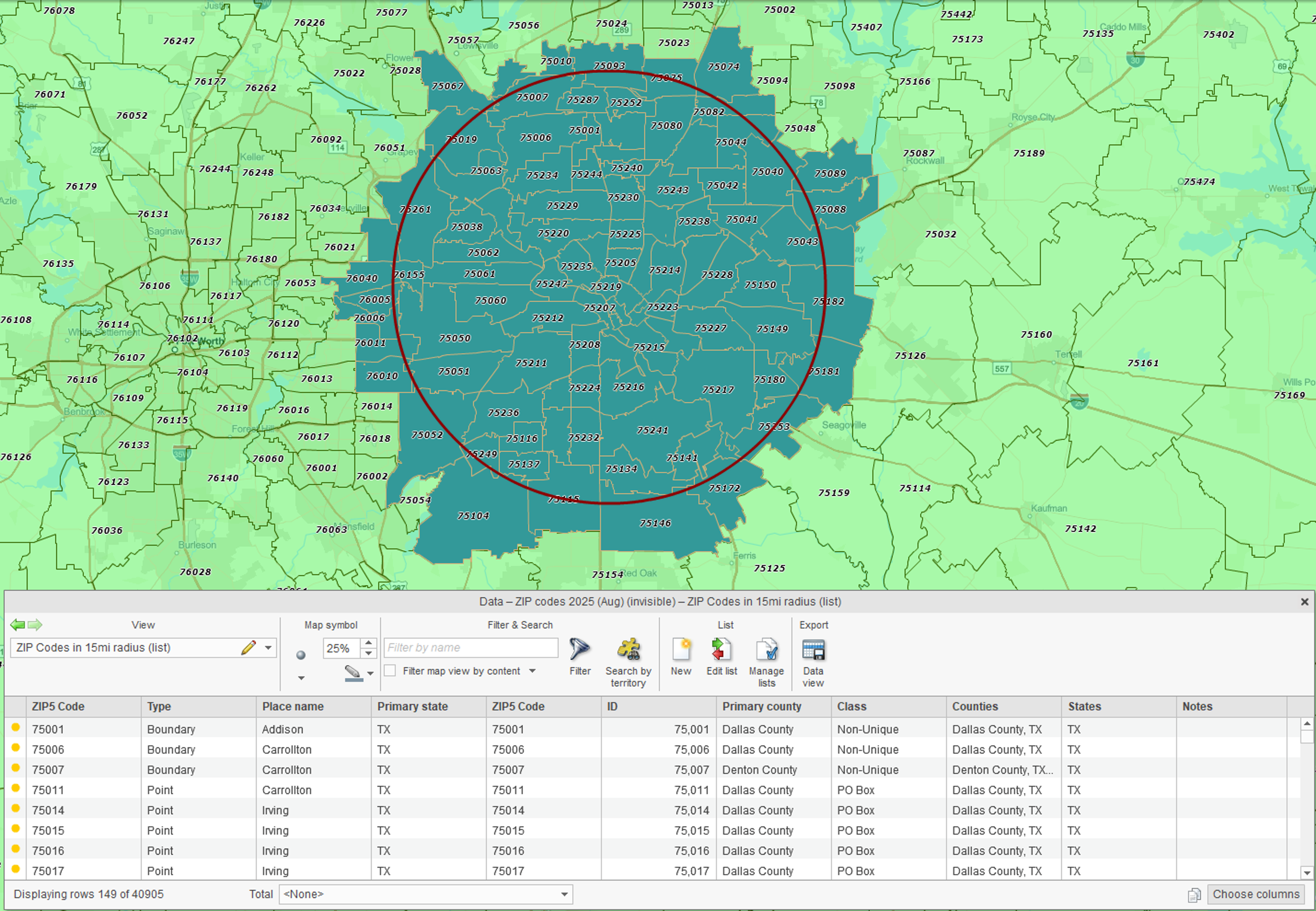
How to Create a ZIP Code Radius Map
MapBusinessOnline makes it easy to create a ZIP Code radius map and export the ZIP codes within the radius:
- Choose a center point by clicking the map or entering an address, city, or ZIP Code.
- Set a radius distance in miles.
- Select the ZIP Code layer to search.
- MapBusinessOnline will automatically create and display a territory made up of the ZIP Codes within the radius.
- Export the territory's ZIP Code list as a CSV file.
ZIP Code radius maps help define market areas around stores, facilities, customer locations, and candidate sites. Once created, they can be used to find ZIP Codes in a radius, analyze demographics, build territories, and support planning decisions.
Examples You Can Try
10 miles around a downtown (e.g., Times Square, Chicago Loop, Dallas City Hall).
25 miles around a warehouse or store (delivery/service area).
50 miles around a clinic or campus (catchment area).
Go Beyond a ZIP Code List
Finding ZIP Codes within a radius is often just the first step. With MapBusinessOnline, ZIP Code radius maps can also be used to:
- Analyze demographics inside your radius — color ZIPs by population, household income, or other Census data. Summarize demographic variables and export ZIP code lists along with demographic data.
- Overlay your customer or prospect data on top of radius-selected ZIP codes to see where your market resides.
- Build territories from radii — turn groups of ZIP Codes within a radius into sales, service, delivery, or franchise territories.
- Expand beyond circles — search by drive-time areas, not just radius rings.
- Find businesses within a radius — search for businesses by industry and other attributes inside your radius.
- Plan optimized routes to reduce drive time for sales reps or technicians.
- Share interactive radius maps with colleagues or clients.
Tips for Accuracy
ZIPs follow USPS delivery areas, not city or county borders, so boundaries may overlap.
Radius ≠ drive-time: A circle is straight-line distance; for traffic-aware service areas, use drive-time polygons in the full MapBusinessOnline application.
Point vs boundary ZIP Codes: Some ZIPs represent only a single building or facility (point ZIPs), while others define a geographic area (boundary ZIPs). Learn more →
Frequently Asked Questions
Can I export the ZIP Codes in my radius?
Yes. MapBusinessOnline lets you export ZIP Code lists as CSV files. You can also export ZIP lists with demographic context for market analysis, territory design, and planning.
Can I run radius searches for multiple stores, reps, or facilities?
Yes. MapBusinessOnline supports multi-location bulk analysis so you can search around many center points and export the results for planning, segmentation, or territory development.
Can I adjust or move a radius after I place it?
Yes. Select the circle and resize or move it until it covers the area you need. Then click Search again to update the ZIP Code list.
Can I use my own data with the radius tool?
Yes. You can upload your customer or location data, apply a radius, and analyze ZIP coverage.
Related Articles
Learn How Our Customers are Succeeding with MapBusinessOnline

"MapBusinessOnline has played a major role in helping us to expand. It has helped us successfully map out our territories so that we know where we are and where we can be. With a clear picture of where we are, it has helped make it easier to locate available territory for our new Franchisees. MapBusinessOnline has even helped us keep our guarantee and carry out its promise for a five mile protection radius for each Franchisee. MapBusinessOnline has not only given us a map of where we are now, but it has also given us a map for our future."
Sine Schirmer
Franchise Support Department Head
The Tutoring Center Franchise Corp

"MapBusinessOnline is an amazing tool that I use every week. When you are creating zip code footprints and trying to determine what zip codes fall within a range of a business, this tool couldn't be any easier to use. There's actually so many functions that are great but specifically I use MapBusinessOnline to create either a mile radius or a drive time radius from a business location. I then use that radius to determine which zip codes fall within the radius. Why is this important? Because I then export the zip codes and use another software that gets me exact counts of how many people fall within that radius in those zip codes. It's Amazing!
I highly recommend this software!"
Chris Farcher
Account Manager
The Mailworks

"MapBusinessOnline one of the most powerful tools I have as a Regional Channel Manager. It’s a difficult task to visually represent the vast amount of data that I have to present to my customers and team members. MBO makes it easy to represent, configure, and manipulate the data on to an effective map. A picture is worth a thousand words, and MBO allows me to create a perfect picture."
Ed Ku
Regional Channel Manager
ABB


